1. 태그
태그: HTML 문서를 구성하고 있는 요소. 이름과 속성(, 속성값)이 있음.
<>와 </>
<>:열린(시작) 태그, </>: 닫힌(종료) 태그
<a href="~~~~"><img src="~~~~~" alt="~~~~~"/></a>이름: a, img, 속성: href, src, 속성값: "~~~~"
2. HTML버전과 편집 툴
ver.5(HTML5) ~_~, 편집 툴: 메모장, Notepad, atom, VSC, VS
저는 VSC로 하겠습니다
확장프로그램 ctrl+shift+x 눌러도 됨
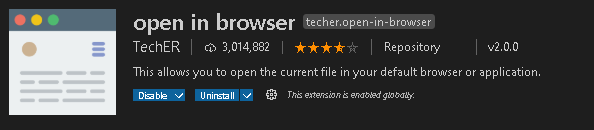
html 실행을 하기 위해서 vsc에서 open in browser를 설치 합니다
prettier

prettier를 사용하면 난잡한 코드를 정리해준다.


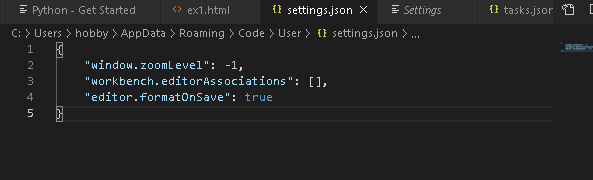
prettier 작동 오류
"editor.formatOnSave":true는 저장했을 때 자동적으로 코드를 정렬해주게 만든다.
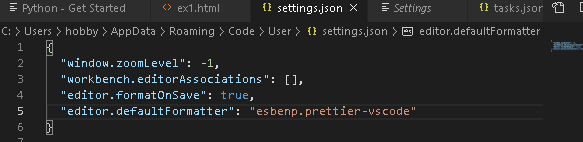
만약 저장했는데 prettier가 제대로 적용되지 않는다면, Default Formatter 때문이다. 이걸 esbenp.prettier-vscode로 바꾸어줘야한다.
settings.json에 "editor.defaultFormatter": "esbenp.prettier-vscode"를 추가하면 된다.
3. 문법
head, title, body, br
<!DOCTYPE html>
<html lang="en" xmlns="http://www.w3.org/1999/xhtml">
  <head>
    <meta charset="utf-8" />
    <title>TITLE</title>
  </head>
  <body>
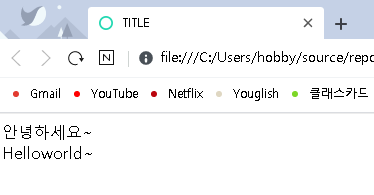
    안녕하세요~<br />
    Helloworld~
  </body>
</html>
<html lang="en" xmlns="http://www.w3.org/1999/xhtml">
<head></head>: 탭 부분에 써져 있는 문구 지정, 설정 값들, 스타일 시트, JS 등의 환경 설정에 관한 정보가 들어감

<body></body>: 내용
<br />: 줄바꿈(<br>로 써도 됨)
h1,p,a,b,i,sup,ins,del
<!DOCTYPE html>
<html lang="en" xmlns="http://www.w3.org/1999/xhtml">
  <head>
    <meta charset="utf-8" />
    <title>TITLE</title>
  </head>
  <body>
    <h1>h1 태그</h1>
    <h2>h2 태그</h2>
    <h3>h3 태그</h3>
    <h4>h4 태그</h4>
    <h5>h5 태그</h5>
    <h6>h6 태그</h6>

    <p>주로 본문에 사용되는 태그로서 단락을 구분</p>
    <p>주로 본문에 사용되는 태그로서 단락을 구분</p>
    <p>주로 본문에 사용되는 태그로서 단락을 구분<br />햄바꿈 태그</p>

    <p>주로<b>본문</b>에 사용되는 태그로서 단락을 구분<br />행바꿈 태그</p>

    <p><a href="http://naver.com">네이버</a></p>

    <p><i>KOREA</i></p>
    <p>KOREA<sup>seoul</sup></p>
    <p><ins>KOREA</ins></p>
    <p><del>delete</del></p>
  </body>
</html>

<h1></h1>~<h6></h6>: 제목 글씨
<p></p>: 주로 본문에 사용되는 태그로서 단락을 구분
<a href="~~"></a>: 어떤 사이트, 다른 페이지로 이동할 때 사용(a태그: 앵커 태그로 하이퍼링크가 걸림)
<b></b>: 글씨를 진하게(bold)
<i></i>: 이텔릭체(기울기)
<sup></sup>: 지수의 형태로 뜸
<ins></ins>: 밑줄이 뜸
<del></del>: 가운데 밑줄이 뜸(삭제 표시)