반응형
문자 선택자
특정 문자 또는 문자열을 선택하여 CSS 속성을 설정할 수 있다.
first-letter, first-line 을 사용
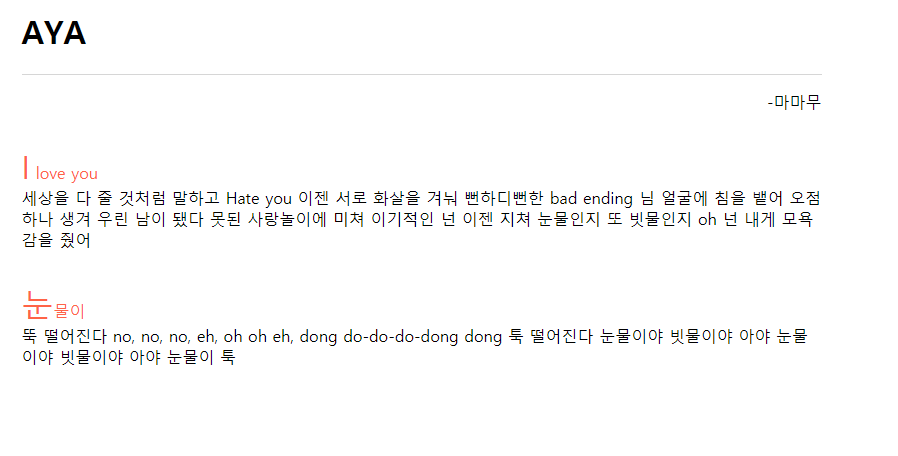
더보기
<!DOCTYPE html>
<html>
  <head>
    <meta charset="utf-8" />
    <style>
      #wrap {
        width: 800px;
        margin: 0 auto;
      }
      #header {
        border-bottom: 1px solid #cccc;
      }
      #p1::first-letter,
      #p2::first-letter {
        font-size: 2em;
      }
      #p1::first-line,
      #p2::first-line {
        color: tomato;
      }
      #content > p {
        float: right;
      }
    </style>
  </head>
  <body>
    <div id="wrap">
      <div id="header">
        <h1>AYA</h1>
      </div>
      <div id="content">
        <p>-마마무</p>
        <p id="p1">
          I love you<br />
          세상을 다 줄 것처럼 말하고 Hate you 이젠 서로 화살을 겨눠 뻔하디뻔한
          bad ending 님 얼굴에 침을 뱉어 오점 하나 생겨 우린 남이 됐다 못된
          사랑놀이에 미쳐 이기적인 넌 이젠 지쳐 눈물인지 또 빗물인지 oh 넌 내게
          모욕감을 줬어
        </p>
        <p id="p2">
          눈물이 <br />
          뚝 떨어진다 no, no, no, eh, oh oh eh, dong do-do-do-dong dong 툭
          떨어진다 눈물이야 빗물이야 아야 눈물이야 빗물이야 아야 눈물이 툭
        </p>
      </div>
    </div>
  </body>
</html>
#content p:first-child::selection{
	background-color:blue;
    color:yellow;
}
selection을 이용해 마우스 커서를 끌어당길 때를 설정할 수 있다
first-child을 이용해 첫번째 태그만을 선택한다.

더보기
<!DOCTYPE html>
<html>
  <head>
    <meta charset="utf-8" />
    <style>
      #wrap {
        width: 800px;
        margin: 0 auto;
      }
      #header {
        border-bottom: 1px solid #cccc;
      }
      #content p:first-child::selection {
        background-color: blue;
        color: red;
      }
      #p1::first-letter,
      #p2::first-letter {
        font-size: 2em;
      }
      #p1::first-line,
      #p2::first-line {
        color: tomato;
      }
      #content > p {
        float: right;
      }
    </style>
  </head>
  <body>
    <div id="wrap">
      <div id="header">
        <h1>AYA</h1>
      </div>
      <div id="content">
        <p>-마마무</p>
        <p id="p1">
          I love you<br />
          세상을 다 줄 것처럼 말하고 Hate you 이젠 서로 화살을 겨눠 뻔하디뻔한
          bad ending 님 얼굴에 침을 뱉어 오점 하나 생겨 우린 남이 됐다 못된
          사랑놀이에 미쳐 이기적인 넌 이젠 지쳐 눈물인지 또 빗물인지 oh 넌 내게
          모욕감을 줬어
        </p>
        <p id="p2">
          눈물이 <br />
          뚝 떨어진다 no, no, no, eh, oh oh eh, dong do-do-do-dong dong 툭
          떨어진다 눈물이야 빗물이야 아야 눈물이야 빗물이야 아야 눈물이 툭
        </p>
      </div>
    </div>
  </body>
</html>
링크 선택자
문서에서 링크(href)되어 있는 문자를 선택하여, CSS속성을 설정할 수 있다.
#content a::after{
	content: '-' attr(href);
}
'-'뒤에 href속성값을 붙인다
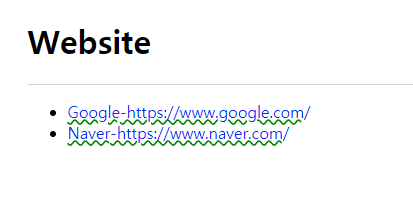
더보기
<!DOCTYPE html>
<html>
  <head>
    <meta charset="utf-8" />
    <style>
      #wrap {
        width: 800px;
        margin: 0 auto;
      }
      #header {
        border-bottom: 1px solid #cccc;
      }
      #content a {
        text-decoration: green wavy underline;
        color: rgb(9, 45, 248);
      }
      #content a::after {
        content: "-" attr(href);
      }
    </style>
  </head>
  <body>
    <div id="wrap">
      <div id="header">
        <h1>Website</h1>
      </div>
      <div id="content">
        <ul>
          <li><a href="https://www.google.com/"> Google</a></li>
          <li><a href="https://www.naver.com/"> Naver</a></li>
        </ul>
      </div>
      <div id="footer"></div>
    </div>
  </body>
</html>
text-decoration => 링크 걸렸을 때 표시 설정 변경
자세한 설명↓
developer.mozilla.org/ko/docs/Web/CSS/text-decoration
text-decoration - CSS: Cascading Style Sheets | MDN
text-decoration CSS 단축 속성은 글씨의 장식(선) 색을 지정합니다. text-decoration-line, text-decoration-color, text-decoration-style, text-decoration-thickness속성 값을 설정합니다. The source for this interactive example is store
developer.mozilla.org
부정 선택자
#content li:not(.fa){
	background-color:#;
}
fa 클래스를 제외한 나머지

더보기
<!DOCTYPE html>
<html>
  <head>
    <meta charset="utf-8" />
    <style>
      #wrap {
        width: 800px;
        margin: 0 auto;
      }
      #header {
        border-bottom: 1px solid #cccc;
      }
      #content a {
        text-decoration: none;
        color: rgb(0, 0, 0);
      }
      #content li:not(.no) {
        text-decoration: rgb(0, 255, 64) wavy underline;
        background-color: rgb(190, 255, 196);
      }
      #content a::after {
        content: "-" attr(href);
      }
    </style>
  </head>
  <body>
    <div id="wrap">
      <div id="header">
        <h1>Website</h1>
      </div>
      <div id="content">
        <ul>
          <li><a href="https://www.google.com/"> Google</a></li>
          <li class="no"><a href="https://www.naver.com/"> Naver</a></li>
          <li><a href="https://www.gogle.com/"> Gogle</a></li>
          <li class="no"><a href="https://www.never.com/"> Never</a></li>
        </ul>
      </div>
    </div>
  </body>
</html>
반응형